Create API Function
- To create an API based function, click on the “Add Function” button on the functions page. You can navigate to the functions page from the top navigation bar.
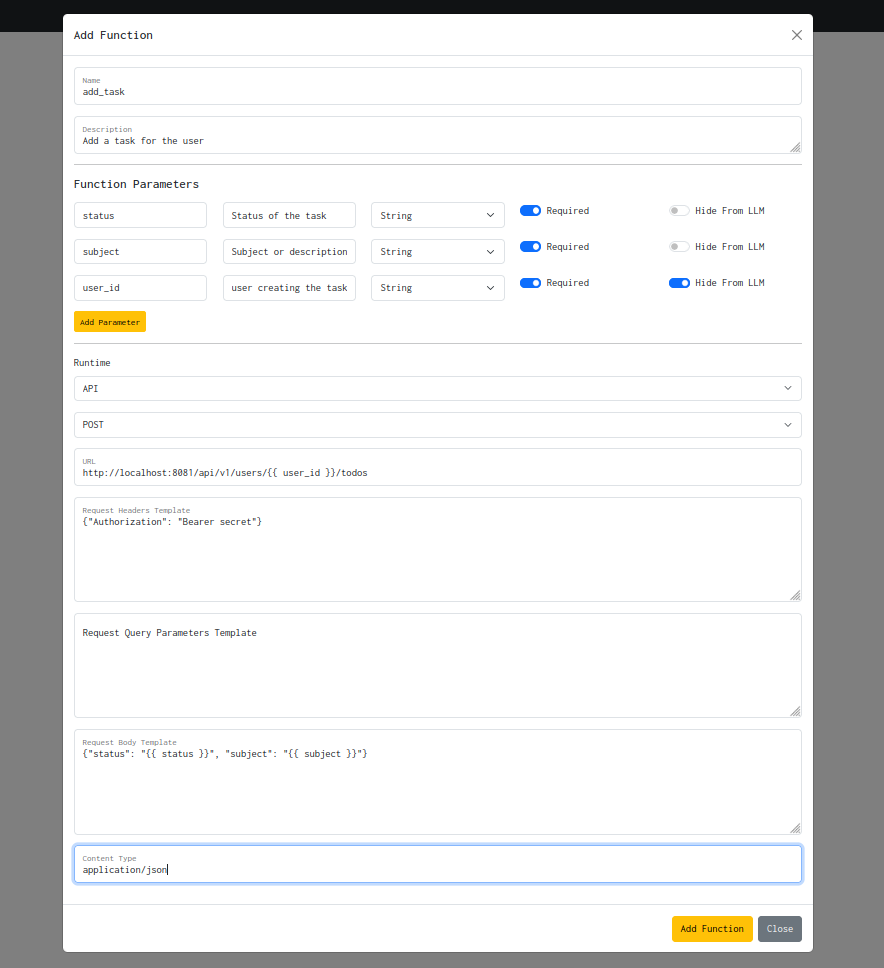
-
Enter the function details including the function input parameters by clicking on the “Add Parameter” button. The
Hide From LLMfield will prevent the field to be exposed to the LLM during agent execution. So typically if you want to pass fields via context directly into the API call, enable it. -
Select the runtime as “API”
-
Fill in the details like the HTTP method type, endpoint, request headers, request body, query parameters and content type.
-
Note that the endpoint, request headers, request body and query parameters are templates, so you can pass placeholder values that will be injected using the parameters during runtime. The template engine used it Jinja2.
-
The headers and query parameters must be passed in JSON format.
-
Click on “Add Function” after adding all the details and the newly created function should show up in the functions list.